Preface B: The UltraStar Format and Editors
The UltraStar format
The UltraStar format (sometimes called the UltraStar TXT format, after its file extension) is the format of charts used by UltraStar-derived competitive karaoke games. When you make a song, your editor will output a text file that will conform to these standards. You don't strictly need to know how the format works since we'll mostly be working with GUIs anyway, but it can be useful to understand the text file format, if you ever want to make small adjustments without opening an editor.
A really basic chart could look like this:
#TITLE:Song Title
#ARTIST:Song Artist
#MP3:song.mp3
#BPM:300
#GAP:1000
: 0 6 2 Hel
: 8 4 4 lo
: 14 4 7  world
- 20
: 22 6 2 po
* 30 4 5 ny
E
In-game, that would look like this:
Gameplay of above example (GIF)
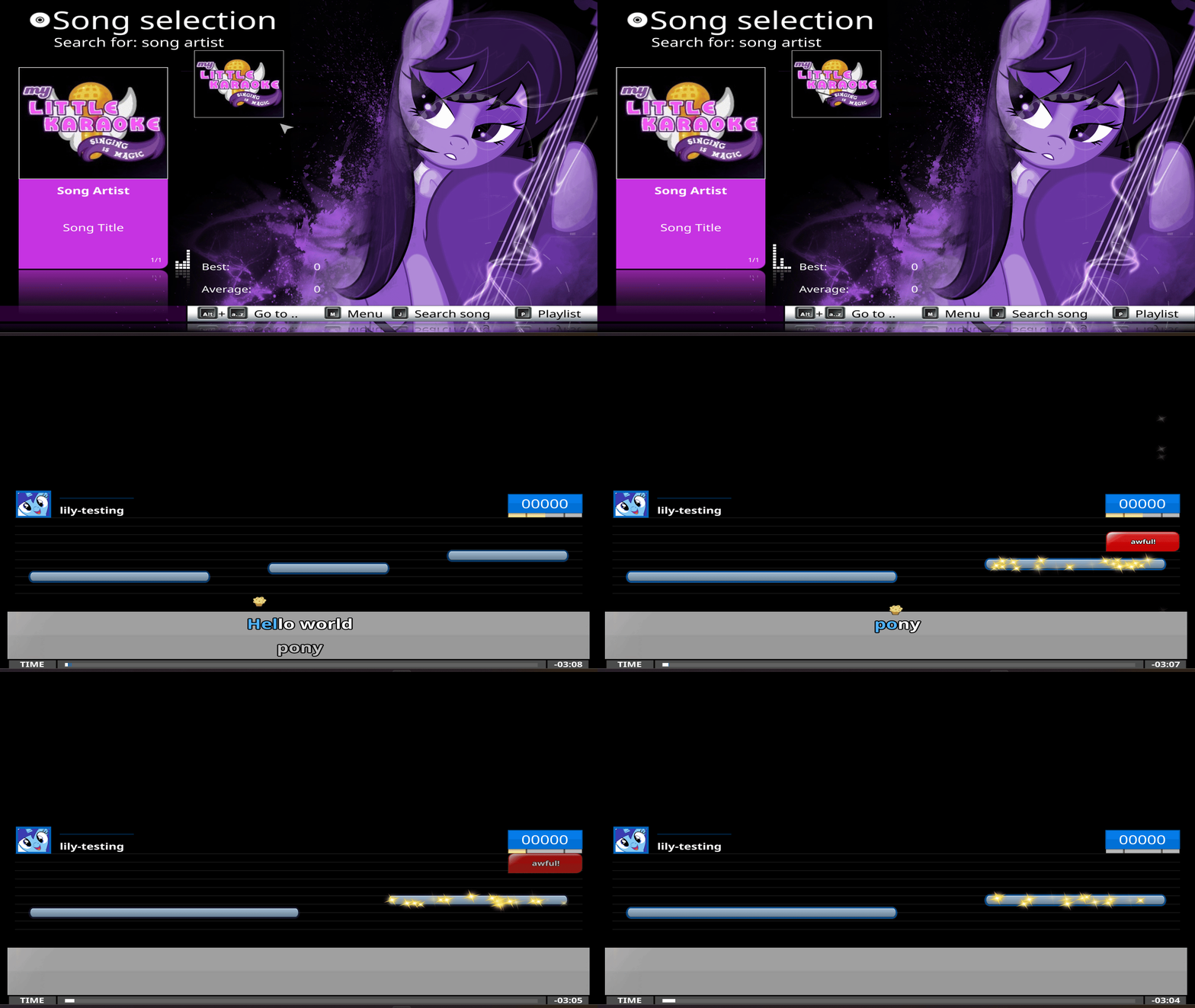
From there, you might be able to see how the components of the format come into play:
- #TITLE was displayed as the song title in the song list
- #ARTIST was displayed as the song artist in the song list
- #MP3 was used to point to the audio
- #BPM was used to determine how 'fast' the chart should play
- #GAP introduced a 1-second (1000 millisecond) gap before the song started
These lines, called attributes, are always at the start of the chart and used to store metadata of the song.
Let's take a look at the notes of the song, from the line : 0 6 2 Hel:
- : indicates a normal note
- 0 is the beat where the note should start. In this case, since it's the first beat and the gap is 1000(ms), this note starts 1 second into the song
- 6 is the length of the note, meaning it should be held for six 'units' (or UltraStar beats)
- 2 is the pitch of the note
And towards the end:
- - 20 indicates a line break at unit 20, splitting the lyrics
Hello worldfrompony - The
*in* 30 4 5indicates a golden note (worth twice the points) instead of a normal note Eindicates the end of the chart
Lastly, you may have noticed the lyrics: there is a leading space in world, which is used to display the space between Hello and world. A trailing space at the end of Hello -- that is, lo with a space at the end -- will also work. For text editor readbility/illustration purposes, this guide will generally use spaces before text, but keep in mind that spaces after text is the default for many programs these days. What you end up picking does not particularly matter, since editors can correct it back and forth without much effort.
Format versioning
The UltraStar format was, historically, not formally standardized. This means that games may not be able to read all attributes, or they would read and interpret a certain attribute differently. This obviously makes the format less portable across games than it should be. Time-based attributes are also inconsistent: some use milliseconds (e.g. #GAP:500), while others use seconds (#VIDEOGAP:0.5). The multilingual nature of the UltraStar community also meant there was inconsistency regarding period and comma decimal separators (0.5 vs 0,5).
As a result, in 2023, community members got together to historically version the UltraStar format and to work towards making everything consistent. This effort is currently not complete, and different softwares support different versions, with one (UltraStar WorldParty) rejecting it (deciding not to conform with the format).
Given that the effort is still in progress, this guide will generally use UltraStar format version 1.0.0, which acts as an 'in-between' for games that do not currently support the newer attributes of the format (e.g. the UltraStar Deluxe version bundled with My Little Karaoke) and for modern games that support newer formats (e.g. the current versions of UltraStar Deluxe, Vocaluxe). You are free to manually add newer attributes -- for example, #AUDIO in favour of #MP3 -- but they may not be recognised by older games. (Editors might even add the new attributes in for you automatically!) This guide is (at least theoretically) a living document, so this may change in the future.
If you'd like to know more about the format specifications, see the documentation on the official webpage. But for most cases, the only mandatory attributes are #TITLE, #ARTIST, #MP3 (or #AUDIO in the newer format), #BPM, and #GAP. Everything else is generally aesthetic (year, song sorting, hidden 'tags', cover art, background art, background video, etc).
Fortunately, you may not even have to worry about these, as song editors will handle this for you!
UltraStar format song editors
When you initially saw the TXT, you may have had some of the following thoughts:
- Wow, that looks really human-readable!
- Wait, do I have to memorise all of these numbers and figure out where each note goes? That sounds like a lot of work.
Well, actually, it's both! The format is human-readable, and positioning each note manually would be very difficult and time-consuming. So, while you could theoretically use a standard text editor to do absolutely everything, it would be a much better idea to use a visual editor, or song editing program (song editor) to assist you in your TXT creation process.
Like with the many games that exist, there also exist many song editors, each with their own featuresets. Some games also include their own editors. Here are the editors I see most often:
- UltraStar-Creator: This editor is mainly used for note positioning, as it remains the fastest way to 'tap' a song out. Other editors may also be capable of this, but the community still generally uses this to create a 'starting point' TXT and then one of the other editors to 'fine-tune' that TXT afterwards. It is not capable of setting pitches; it is purely for timing notes.
- Yass Reloaded: This is what I primarily use. It is a fork of the original Yass, but with additional convenience features. It is also actively developed. This is the editor that I will be using for fine-tuning.
- Karedi: This is an actively developed alternative to Yass Reloaded. I have never personally used it, but it sports its own comprehensive tutorial that you should definitely go check out!
- UltraStar Deluxe... actually contains its own editor! You can open it by pressing
Ewhile a song is selected. Personally, I use it when I have very small adjustments to make, since it means I don't have to exit the game to make any changes. - Melody Mania / UltraStar Play also have a built-in editor. I've never used it, so I don't have any opinion on it.
And of course, since the TXT format is just binary text, you can make adjustments with your editor of choice. Notepad, CotEditor, Kate, whatever.
A note when using text editors
It is a lot easier to break something in your TXT file if you use a text editor (an errant typo, an accidentally deleted attribute), so you may want to make a backup before making any changes.
Next steps
Now that you have an idea of the ecosystem and the tools you can use, you can get started on charting a song! Yay!
<< Back to Preface A: What is Competitive Karaoke? >> Continue to Part 1: Audio
Quick navigation: Index / Preface A / Preface B / Part 1: Audio / Part 2: Lyrics / Part 3: BPM / Part 4: Tapping / Part 5: Finetuning / Part 6: Pitching / Part 7: Golden Notes / Part 8: Testing / Part 9: Submission](../part09)