Part 6: Pitching
TL;DR
To pitch a note, you can do any of these things, even simultaneously:
- Brute force: With enhanced vocals (or possibly an a cappella track, whether provided by the artist or computer-generated), enable MIDI note playback (Ctrl+B) and keep playing the note until you recognise there is no longer any dissonance between the pitch that the singer is singing and the note on the piano. If, no matter what the note is, you cannot find the pitch, mark it as rap, as it may be an unpitched note.
- Piano, music theory, relative pitch: Once you have one pitch, use an understanding of music theory to figure out the notes that logically follow: for example, you might recognise that the distance between the first note and the next is a minor third, and if you know the first note is an F#, then it logically follows that the next note is an A. Yass lets you define a song's key, after which any note that is outside of that key will be flagged as possibly incorrect.
- Computer assistance: If you use Aubio with a vocal/a cappella track (using UltraStar format v1.1.0), Yass will 'move' the waveform display to an algorithmically determined pitch. This is not always correct, but is often correct. You can also try using something like ultrastar_pitch.
- Human assistance: Ask someone (politely) with more experience to pitch the song for you. It's perfectly okay to ask for help; that's what a community is all about.
Once all of your notes are pitched, play through the entire song with MIDI playback enabled. If one of the notes is wrong, the melody should sound dissonant to you. If so, re-evaluate the pitch that sounds wrong in the line.
Background
Pitching is the final substantive step of making an karaoke chart. It is effectively the 'other half' of the two main components of competitive karaoke: the timing and the pitch.
The main problem with it is that it's kind of hard to explain and conceptualize. We know that syllables have a defined time and a defined pitch. The defined time is relatively easy to describe: it's when you are at the 'core' of the syllable, just after you hear it start and right about when you stop hearing the vowel portion.
Pitch is a bit different. It's how high or low a note is. That's not necessarily something that's easy to define. You might be able to tell that a note is higher or lower than another note, or dissonant in comparison with another note, but most people aren't able to figure out a pitch without having a frame of reference, and then continually working off that frame of reference. That generally requires an understanding of music theory, some sort of musical training, things like that. Things that require learning and practice.
So, the first thing you should know about pitching is that it is perfectly acceptable to ask someone else to do it for you. If the rest of your chart is well-timed, you've already done the bulk of the hard work. If pitches are something that your brain cannot conceptualize, that is perfectly fine. Ask someone to pitch it for you and all will be well.
If you do still want to figure out how to pitch things on your own, I'll try my best to give advice, but I have to admit I am unqualified to explain how most people would learn to pitch things, because I personally hear and understand music a bit differently from how others might1. So, please understand that I am giving advice based on what I have heard from other people and not based on my own personal experience.
You can click here to get a copy of our example song's TXT with all notes positioned, but unpitched, if you would like to use this song to practice pitching.
For a more helpful step-by-step tutorial, I defer to the tutorial created by the folks who make the Karedi editor. There, you will find similar advice to the stuff given here, but possibly explained in a more approachable manner. Even though we've been using Yass for song editing, the principles of pitching are the same no matter what editor you're using.
Method 1: Brute force
This is the method that's described on Karedi's tutorial. As best as I can tell, the idea is that most people are able to tell when a note is dissonant with another note. So, you would just shift each note up and down until you no longer hear any dissonance. Repeat this for every note.
Method 2: Piano and music theory or something
While Yass includes a digital piano, you can also use a physical piano (or MIDI keyboard, or synthesizer, or whatever) if you think it might be more helpful. If you understand music theory, you may also be able to use your understanding of note relations to help you pitch. For example, if you know through trial and error that the first note is an F#, and then the next note you hear has a 'minor third' relationship with F#, then you know that the second note is an A.
If you have a good pitch memory -- for example, you know for a fact and can mentally hear that the first note in Toto's Africa is a C# -- then you can use that reference note to figure out the pitch of all notes. For instance, the first note in our song has an perfect fourth relationship with C#, therefore it is an F#2.
Yass also has a feature to set the key of the song. For most traditional songs, you can perform a web search to figure out what key they're in. In this instance, most search results are telling me that the key of the original song (Whatsername) is D major, so that is probably also the case for our parody example song.
If you use Yass to set the key to D major, then any key outside of D major (that is, any key ASIDE FROM: D, E, F#, G, A, B, C#) will be flagged as orange, telling you to take another look at it. That does not mean that the key is wrong; songs can change keys. But it can work as a hint to indicate that you made an off-by-one error or something.
Method 3: The magic of computers
These days, there are AI3 tools that can algorithmically determine pitches. Yass has one built in, called Aubio. It requires the following:
- Aubio itself, downloaded and its location defined under
Extras > Preferences > Library > Locations - A vocal-only track (a cappella) of your audio, which you can acquire from the artist or use AI3 to generate with something like Spleeter
- The vocal track to be defined as #VOCALS, and for the UltraStar TXT to use format version 1.1.0
- You can change UltraStar TXT version in Yass from
Extras > Preferences > Error Checking > Tags > Compatibility
- You can change UltraStar TXT version in Yass from
If it's configured correctly, you should see something like this:
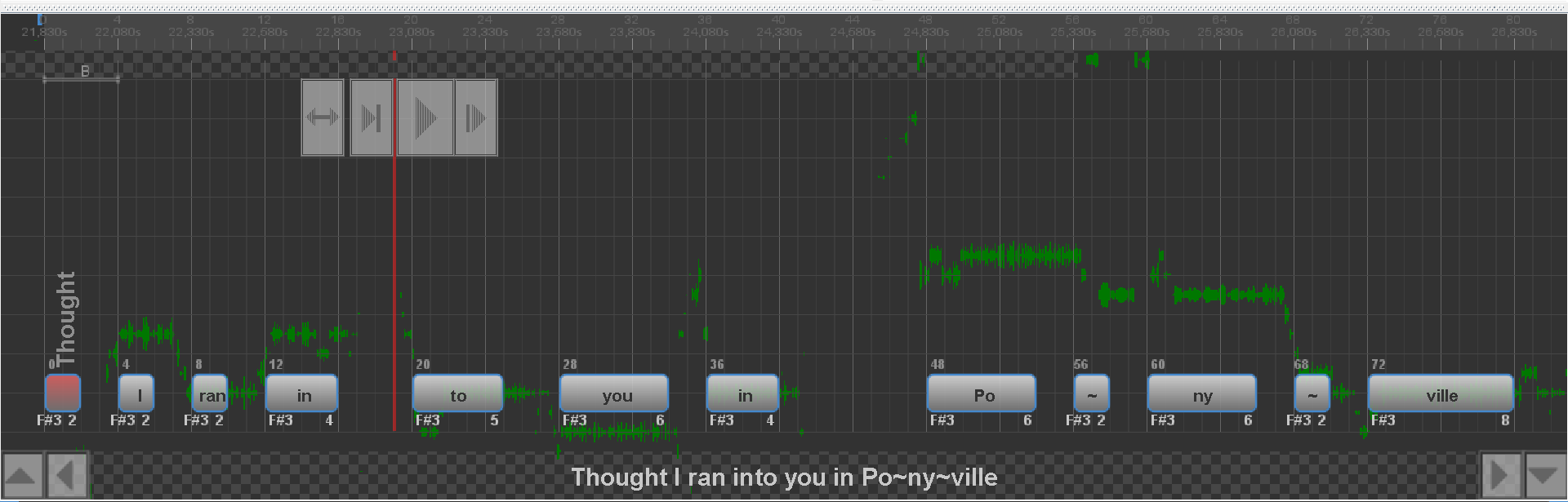
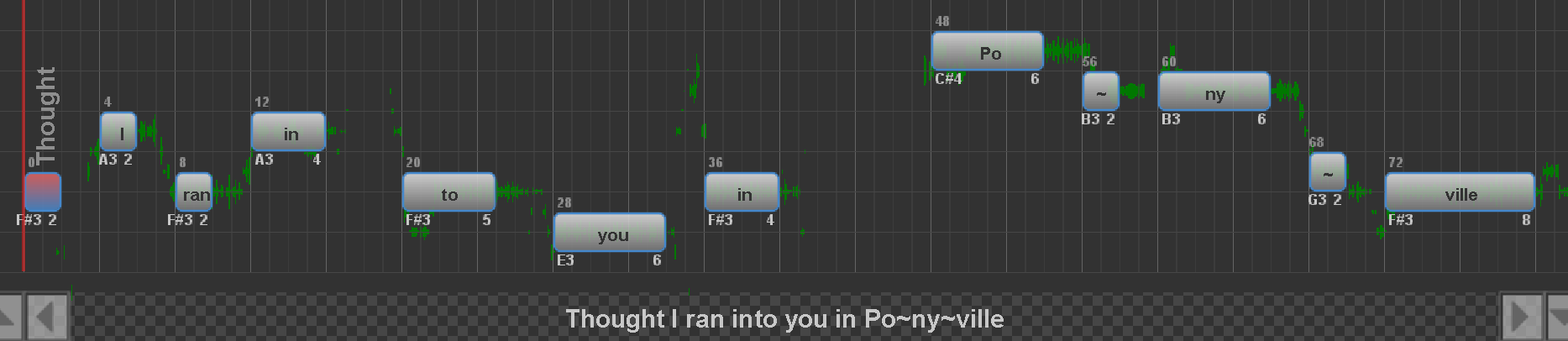
As you can see, the waveforms have been visually moved so to align with a pitch. From there, you can move each note to where the waveform is (roughly) and you may end up with the correct pitch, or something close to it.
Aubio-defined pitch positions
You can also try using something like ultrastar_pitch or UltraSinger. I have never used either, so I don't have any advice to give on those, sorry.
Method 4: Asking for help
You can always just ask someone in the community (politely) to pitch the song for you. Obviously, learning to pitch for yourself is ideal because then you can just make songs independently, but if it never quite clicks, then being able to position notes well and then asking someone else to pitch is by no means a bad thing.
It also doesn't necessarily mean that someone pitches the whole thing for you. You could give it a fair shot yourself, and then ask someone who has more experience to verify that your pitches are correct, and use that information to help train your 'pitching strength' in the future. You can do it!
Once you're done pitching
After you've finished pitching, I highly recommend that you play back the whole song with MIDI/piano sounds enabled. Just like most people should be able to tell when there is dissonance between the singer's voice and a piano pitch, most people should also be able to tell when a melody played as a whole sounds kind of... off. Like, if you were listening to someone play piano and they played a wrong note and that note were part of the melody, you would probably immediately notice it. I presume the same thing applies to song pitches.
For posterity, you can see below for a video of me pitching this song. The first half was aided by Aubio's visual analysis (to demonstrate its utility), while the second half was done by ear. After I've finished pitching, you can see me go through every line to see if there are any dissonant pitches to correct.
Pitching example
Next steps
Once you're done pitching, the penultimate step is to set golden notes. Or you can just not set them at all; personally, I don't set golden notes in songs anymore outside of special occasions. On the other hand, they are fun, so they enhance the gameplay experience in some way. Ultimately, it's up to you.
<< Back to Part 5: Finetuning >> Continue to Part 7: Golden Notes
Quick navigation: Index / Preface A / Preface B / Part 1: Audio / Part 2: Lyrics / Part 3: BPM / Part 4: Tapping / Part 5: Finetuning / Part 6: Pitching / Part 7: Golden Notes / Part 8: Testing / Part 9: Submission
-
Specifically, I have absolute pitch, which means I think of pitches in terms of their note names (that is to say: I hear a pitch and can immediately name what note it is). This is obviously very useful for pitching, but it doesn't really work as advice to give to other people. Unless you try to learn relative pitch? I think Method 2 is sort of going down that route. ↩
-
Technically it's not sung with a very clear pitch, so I would possibly mark it as rap, but if I were to give it a pitch I would infer it would be a F# because that is melodically what makes sense if we look at it in context with the rest of the song. ↩
-
In the machine learning sense, not in the large language model sense. ↩↩