Part 3: BPM
TL;DR
- Find the song's BPM. There are three main ways to do this:
- a. Google
name of song+BPMand look for the most consistent result. This will generally only work for popular songs or parodies of popular songs. - b. Use a program to automatically calculate the BPM for you, such as the MixMeister BPM analyzer. If you don't get an integer (whole number), then round to the nearest integer.
- c. Tap out the BPM yourself. This is the method I recommend as it is the most reliable.
- a. Google
- Verify that you have the correct BPM, using a metronome. Setting the metronome to use eighth notes instead of quarter notes (or doubling the BPM) may be helpful as you will be able to tell sooner if the BPM is incorrect.
- Multiply your BPM by two or four until it is roughly between 230 and 400. You can always recalculate the BPM later if necessary.
- Multiplying by three is acceptable, but notes will not align as well.
Finding the BPM
The next step is to find the BPM (beats per minute, speed) of the song. If you made songs a long time ago, you may wonder why you need to do this: indeed, it used to be standard advice to just set the BPM to 300 or 400 and call it a day. While this advice is still valid in some cases -- for instance, when the BPM changes a lot throughout a song -- it is inefficient for consistent BPM songs for one main reason: beat alignment.
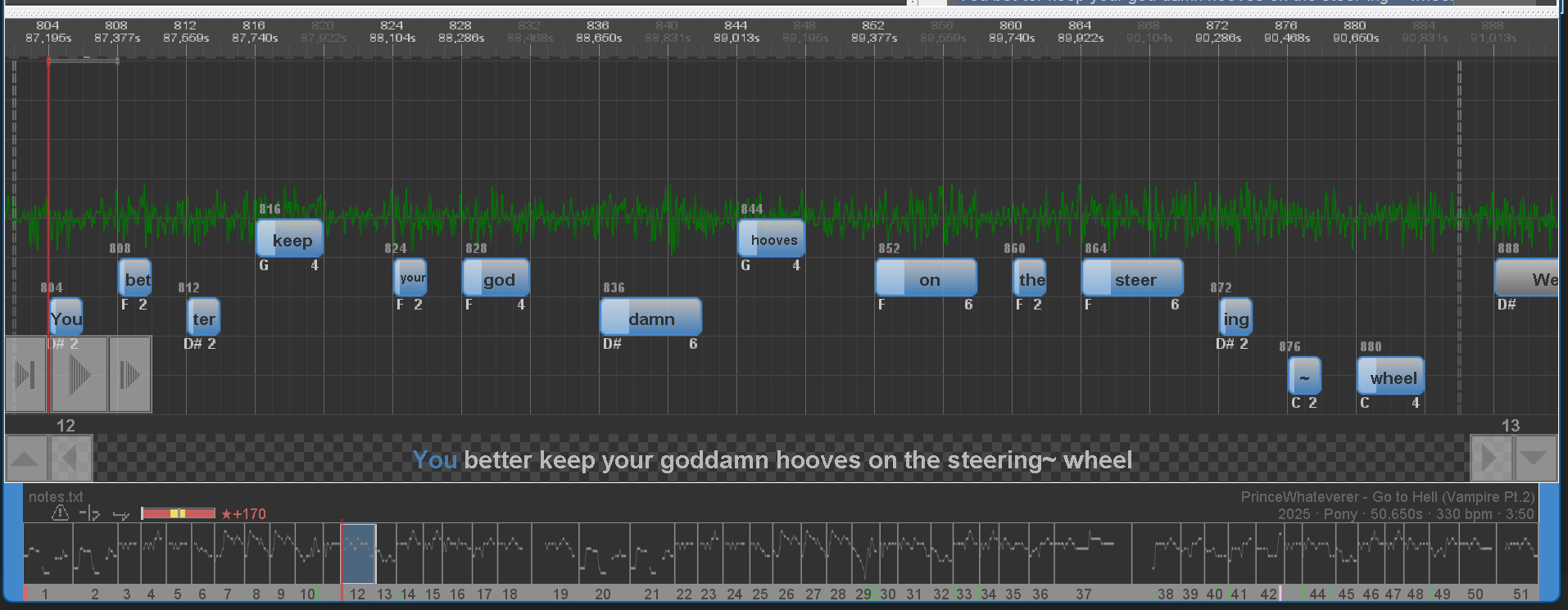
In the image, you will notice that each note starts at a strong gray line, even though more beats of precision exist (namely, the three gray lines that are between each strong gray line). This is intentional. For most rhythmically consistent songs, notes will start exactly on the strong gray lines, and the timing will be near-perfect:
Video: On-beat note alignment
Compare this to a song without a consistent BPM, where you might be stuck using 300 or 400: it'll be a lot harder to align the notes!
Video: Off-beat note alignment
Song: 4everfreebrony - Many A Lifetime (Led Zepplin "Stairway to Heaven" parody)
Of course, "harder" doesn't mean "impossible". But it can be very discouraging to have to place each and every note manually, compared to a consistent BPM song where you can just place them on the strong gray lines and (for the most part) call it a day. So, save yourself the effort and figure out the BPM now to save a heck of a lot of time later.
There are multiple methods to find the BPM. Here they are laid out:
Option 1: Google it
Chances are, you are doing some song that is actually established outside of the context of a specific fandom. If you just do a web search for song name + BPM, you're likely to get what you're looking for. Since the song I'm doing in this example is a parody of an existing song, we can give it a shot:
Whatsername's BPM
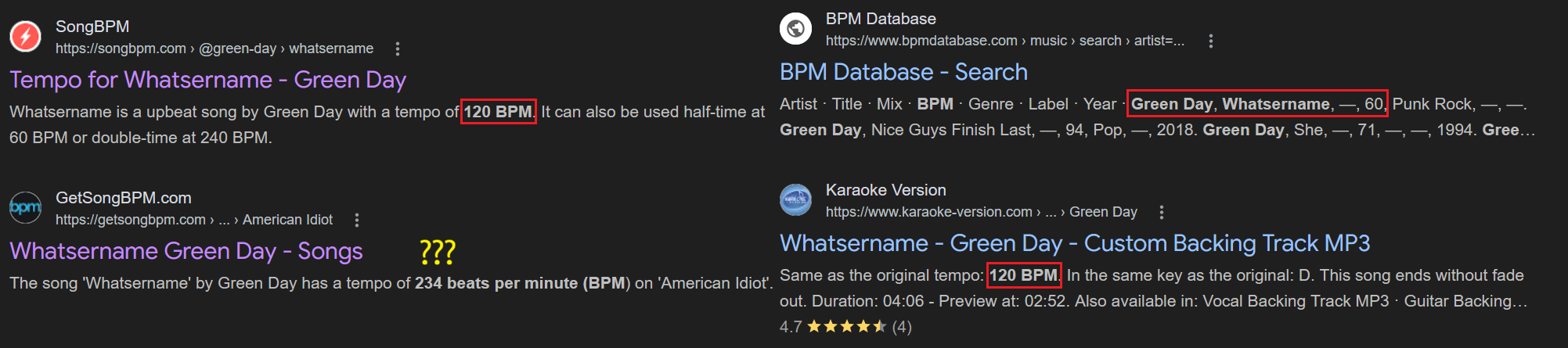
It looks like web sources are generally in agreement that Whatsername's BPM is 120 (60 is just half of 120, and the outlier of 234 does not make sense).
Option 2: Automatic BPM calculation
If the BPM for your song can't be found online, you can try automatically calculating the BPM. There are a number of tools for this: UltraStar-Creator has one built in, and people tend to recommend the MixMeister BPM Analyzer. Let's try both and see what we get:
Automatic calculation results
MixMeister BPM Analyzer:

UltraStar-Creator:

It looks like we got 119.97 (which rounds to 120) and 241. That's close (and correct in MixMeister's case), but not quite correct. This is why it's important to verify the BPM you get -- because automatic calculation tools have a chance to get it wrong. It would be subtle at first -- you would only be drifting by one beat every minute -- but since most songs are at least three minutes long, an incorrect BPM is bound to mess up the timing.
Wouldn't an automatic calculation be more accurate?
You may be thinking that MixMeister's BPM of 119.97 is "more accurate" simply because people would be unable to distinguish between a BPM of 119.97 and 120. While that latter fact is true, the vast majority of music uses an integer BPM.
Setting the BPM to 119.97 means that the song will run just slightly slower -- each beat being 499.8ms rather than 500ms. While this starts out small, this compounds to around 36ms slower (cumulatively) by about the three minute mark, possibly placing all notes behind by at least 1 UltraStar unit depending on the granularity.
It is better to assume that the BPM is an integer (since a lot of music backing tracks are composed electronically anyway, where a BPM can be explicitly defined). Otherwise people might assume that you got a computer to calculate the BPM for you and then didn't verify it whatsoever.
And of course, the BPM calculation can just end up completely wrong -- for example, UltraStar-Creator's is a whole half beat off (presumably getting 120.5 and doubling it). BPM analysis is algorithmic and can be influenced just by song instrumentation, so you should only use it as a way to help verify that you got the correct BPM from one of the other two methods. And don't forget, you should always use a metronome to verify that you got the BPM correct.
Option 3: Tapping it out
This is the option I recommend the most, because it's the most consistent. There are multiple apps and websites that you can use to do this; I personally use this one. If you've ever done timing calibration in a rhythm game, it's pretty similar to that.
Let's set our precision to two decimal points, tap for a bit, and see what we get:
Video: Tapping out BPM
It looks like after around 30 seconds of consistent tapping, the BPM stabilised around 120. So that's probably what our BPM is!
Testing our BPM
From all three methods, we got a method of exactly 120 (or close to it), so let's use a metronome to see if we were correct.
Video: Not the Same with 120 BPM metronome
Note: The BPM has been doubled to 240 with eight beats to simulate eighth notes, which can help with ensuring the timing is accurate. It is functionally equivalent to 120BPM.
It looks like we got the correct BPM, so we can continue to the next step! 🎉
Multiplying the BPM
You may think that, since we've verified the BPM is 120, we can simply set that as our BPM and everything will be fine. However, UltraStar's BPM calculation actually works a bit differently. The technical details aren't really relevant, but in layman's terms: the BPM needs to be multiplied in order to add more granularity -- to allow you more options for note positions when finetuning.
Technical details: UltraStar BPM calculation
This explanation is generally paraphrased from Karedi's explanation.
UltraStar BPM works by taking the BPM and multiplying it by four for resolution. In our case, the song BPM is 120, which means that there is one musical beat every half-second (500ms). Thus, each UltraStar beat -- what I usually call a 'unit' to distinguish it from a musical beat -- is 125ms. This is generally not enough granularity, as it means that a note that is sung slightly off has to be placed either 125ms before or 125ms after the current position. To fix this, we multiply the BPM by an integer -- for example, from 120 to 240 so that we can place notes every 62.5ms, or from 120 to 360 so that we can place notes every 41.67ms.
BPM can be multiplied or divided later on if more resolution is necessary. So, if you start at 240 and find that it's not granular enough, you can use a chart editor to recalculate everything for a BPM of 360 or 480 or whatever. Multiplying a BPM (from 240 to 360) doesn't lose any information, but dividing a BPM (e.g. from 360 to 180) does.
It is generally recommended to multiply any given song's true BPM by two or four to provide enough granularity. In general, we want to use a BPM between 230-ish and 400-ish, because anything less than that won't be granular enough while anything more than that will be too granular (i.e., you will waste a lot of time placing notes in just the right position when it won't even matter).
What about multiplying by three?
Multiplying by three is also acceptable, but it means that notes will only align to every other strong gray line, rather than every strong gray line. Here's an example of a song where I multiplied the BPM by three, from 130 to 390:
Song: 4everfreebrony - Future (What Are The Odds)

In general, I would recommend multiplying by two to start with, and then recalculating to multiplying by three only if you need the granularity, and only if multiplying by four is excessive. For example, for a 120 BPM song, 480 is excessive, so we would initially chart with 240, and then recalculate that to 360 if we need the granularity later on.
If multiplying by four is possible, then you should do it, even if it slightly goes above 400. For example, a BPM of 102 multiplies by four to 408. This is generally preferred over 204.
In our case, since the song's true BPM is 120, we'll double it to 240 (which is, incidentally, pretty close to what UltraStar-Creator automatically calculated for us).
Songs with an inconsistent BPM
If this is your first song, I highly recommend against doing a song with variable BPMs. It is generally more complicated to explain, and worst-case scenario, you will have to align each note individually, which can really kill your motivation.
Otherwise, what you should do depends on the nature of the song's variable BPMs.
If the song has one main BPM but changes speed for a few lines
If the song has one main BPM, but changes speed (slows down, speeds up) for a small part of the song (less than 20% of the song), then you should just use the BPM of the majority of the song. For example, if most of the song's BPM is 120, then use 120 (and then multiply it by two to 240).
For the portion of the song with a different BPM, you will probably want more granularity. Continuing with the example BPM of 120, I would recommend doing everything in 240 to start with, and then recalculating to 360 only after you have set the note positions for the main part of the song (i.e., everything other than the slowdown/speedup). That way, when you recalculate the BPM, everything in the main part will already be correctly positioned (meaning you don't have to do the mental math of where a note needs to go when the BPM is multiplied by three), and you will have more granularity to work with in the part with a different BPM.
If the song has two (or more) main BPMs
If the song has very clear points where there are multiple BPMs, you can try splitting the song into multiple songs. This is a trick I used with Green Hay's Princess of Equestria and Return of the Princess (parodies of Green Day's Jesus of Suburbia and Homecoming, which are each nearly ten minutes long). You can see my example work here (ZIP archive, includes audio).
Once you have split the audio into multiple tracks, treat each track as a separate song. Then, once you have charted all of the songs and ensured all notes are in the right places, recalculate the BPM of each chart to something high (400 or 500), to ensure that as many of the original note positions are maintained as possible. From there, you can paste all of the parts together in your editor, and you'll end up with something like this (get the audio from here).
If the BPM is all over the place or unknown
There are cases where the BPM changes so often that it is impossible to determine one single BPM. An example is this instrumental of My Shot from the musical Hamilton, where you can see in the top right ("TEMPO") that the BPM is constantly changing (from 91.25, to 89, to several other numbers).
In a case like this, you will have no choice but to set the BPM to 400 and time each and every note manually -- the thick gray lines will effectively be useless.
While difficult, it definitely can be done. Best of luck!
Next steps
Once you've decided on a BPM to use for your chart (remember, you should multiply it until it's roughly between 230 and 400), you're ready to start tapping!
<< Back to Part 2: Lyrics >> Continue to Part 4: Tapping
Quick navigation: Index / Preface A / Preface B / Part 1: Audio / Part 2: Lyrics / Part 3: BPM / Part 4: Tapping / Part 5: Finetuning / Part 6: Pitching / Part 7: Golden Notes / Part 8: Testing / Part 9: Submission